Wet vs Dry Filament: How to Tell & How to Fix It
Dry filament wins for virtually every print you care about, and the single strongest reason is consistency: moisture-contaminated filament produces unpredictable extrusion, weak layer adhesion, and surface defects that no slicer setting can fully compensate for. If you are staring at a spool and wondering whether it is the source of your print problems, the short answer is that most stringing, popping, and brittle-filament failures trace back to absorbed water. This guide gives you concrete checks to confirm wet filament, a clear operator flow to dry it properly, and the decision framework to know when the spool is beyond saving.
How to Tell Wet Filament from Dry in Under a Minute
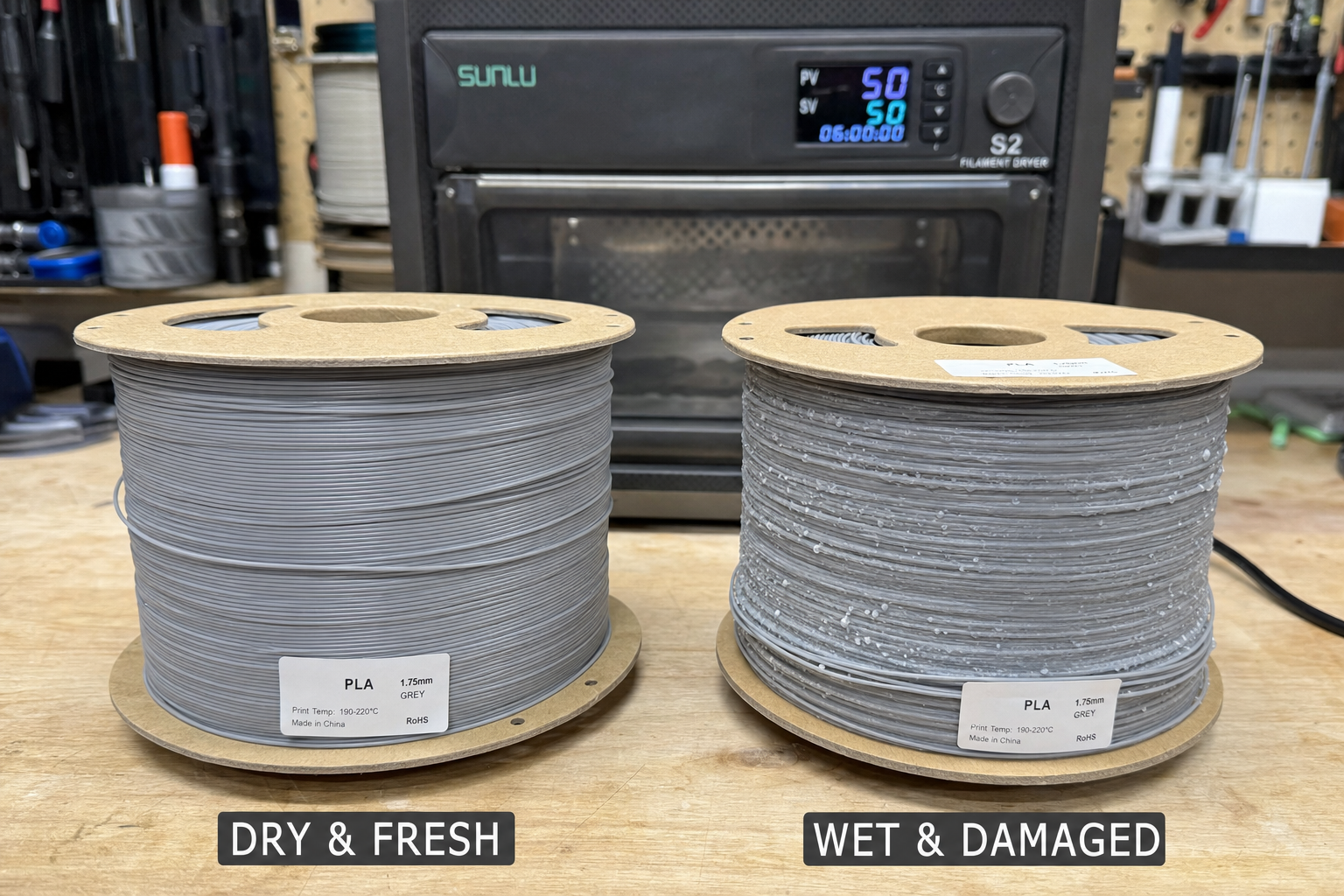
The fastest field check does not require a moisture meter. Dry filament bends without snapping, extrudes quietly, and leaves a smooth, uninterrupted bead on the build plate. Wet filament announces itself with audible pops and hisses from the nozzle, intermittent extrusion that looks like missing dashes in a purge line, and thin wispy stringing that resembles fine hair rather than thick spiderweb strands. Thin stringing—the kind that looks like cotton candy stretched across gaps—is almost always mild moisture oozing rather than a retraction failure, and it is the most overlooked signal in troubleshooting forums.
A second concrete check: snap a short length of filament off the spool and bend it sharply between your fingers. PLA that is saturated will crack or snap cleanly at a bend radius that dry PLA handles easily. PETG and nylon are less brittle when wet but will still show surface roughness and inconsistent diameter under light tension. If you hear any crackling during the bend test or see micro-fractures along the curve, moisture has already migrated deep into the polymer. This is not a surface-drying problem—it requires a full dehydration cycle.
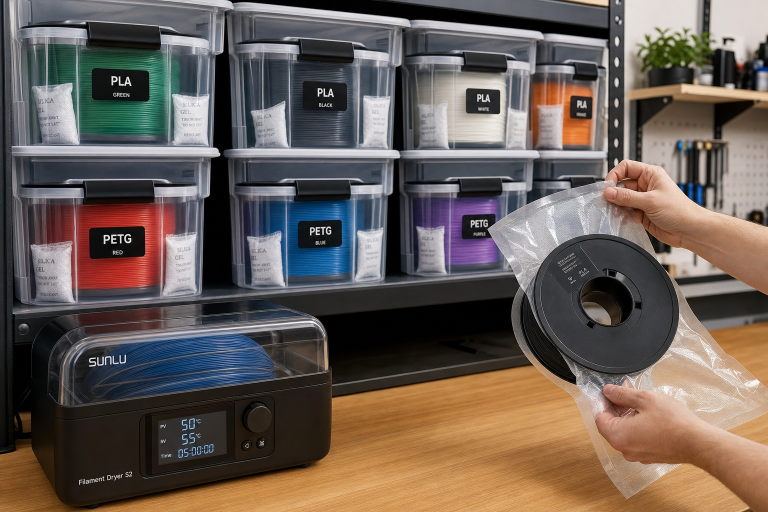
The counter-intuitive angle most generic articles skip: filament can be wet straight out of a vacuum-sealed bag. Manufacturers cool extruded filament in water baths, and if the drying stage before packaging is rushed, the spool arrives pre-loaded with internal moisture. The desiccant pack in the box only maintains dryness; it does not actively pull water from saturated filament. Treat every new spool as suspect until you run a purge line and listen for pops, especially with hygroscopic materials like nylon, TPU, and PETG.
Diagnostic fork: what the bend test tells you next. After the snap test, your next action depends on what you observe. If the filament bends without cracking and extrudes silently, your stringing or adhesion problem is likely a slicer setting—drop your nozzle temperature by 5°C and re-run a retraction calibration before blaming the material. If the filament snaps cleanly but you hear no popping during extrusion, you are dealing with age-related embrittlement, not moisture.
PLA left in direct sunlight or near a heated enclosure for weeks can degrade without absorbing water. This spool may still print but will snap during filament changes and mid-print retractions. Use it for draft prototypes where a mid-print failure is not catastrophic, and keep a fresh spool for final parts. If the filament both snaps and pops, proceed to the full drying flow below.
How to Dry Filament: Ordered Steps with Checkpoints
This flow assumes you have confirmed wet filament using the snap test or audible popping during extrusion. Work through these steps in order, with natural checkpoints to avoid over-drying or damaging the material.
Preparation checkpoint. Before applying heat, remove the filament from any sealed dry box and place it on a clean surface. Cut off the first two meters of filament if the end feels brittle or shows diameter inconsistency. This is the section most exposed to ambient humidity during storage, and feeding it into a dryer wastes time and risks a mid-print snap.
Step 1: Match the drying temperature to the material. Use a dedicated filament dryer, a food dehydrator, or a convection oven with verified temperature accuracy. The concrete constraints:
- PLA: 40–45°C for 4–6 hours. Exceeding 50°C risks softening the filament enough to fuse coils together, ruining the spool.
- PETG: 55–65°C for 4–6 hours. PETG absorbs moisture more slowly than nylon but releases it reluctantly; under-drying leaves intermittent extrusion gaps.
- TPU: 45–55°C for 5–8 hours. Flexible filaments trap moisture in their amorphous regions and need longer dwell times.
- Nylon: 70–80°C for 8–12 hours. Nylon is the most hygroscopic common filament; anything less than a full overnight dry is a partial fix.
Step 2: Ensure airflow. A heated enclosure without active airflow creates a humidity bubble around the spool. Filament dryers with built-in fans are ideal. If using a food dehydrator, confirm the spool fits without blocking air circulation. For oven drying, prop the door open slightly with a wooden spoon handle to let moisture escape, and place the spool on a middle rack away from direct heating elements.
Step 3: Run a verification print. After the drying cycle, load the filament and extrude 100 mm at your normal print temperature. Listen for pops. If you hear even one or two, return the spool for another two hours. A completely dry spool extrudes in near silence. Print a small stringing test tower—the two-cone model is fast and reveals thin hair-like strings that indicate residual moisture. Adjust your print temperature down by 5°C if stringing persists after a confirmed dry, since wet-filament temperature compensation often masks the real problem.
How to confirm the fix worked. A successful dry cycle produces three observable results: the filament extrudes silently with no popping or spitting, the purge line is a continuous smooth bead with no gaps or dashes, and a stringing test tower shows zero thin wispy strings at your normal retraction settings. If you achieve all three, the filament is print-ready. If thin strings persist but extrusion is silent, the moisture is gone and your retraction or temperature settings need tuning independently. Do not chase retraction settings on wet filament—you will over-compensate and create new problems when the material finally dries.
When Drying Is Not Enough: Failure Cases and Recurrence Patterns
Moisture damage exists on a spectrum, and not every spool returns to print-ready condition. The most expensive failure case is partial hydrolysis in engineering filaments. A nylon spool that spent six months in an unsealed basement may dry to the touch but will produce parts with 30–50% lower interlayer adhesion than factory-fresh material. The print looks correct, but the part fails under load. If you are printing functional components—brackets, mounts, gears—and the spool history is unknown, the safer decision is to start fresh and treat the old spool as prototype-only material.
A second failure case: filament that has absorbed enough water to swell unevenly. Diameter variation beyond ±0.05 mm from the manufacturer’s spec causes extrusion pulsing that no amount of drying corrects. Measure the filament in five spots along a one-meter section with calipers. If the range exceeds 0.1 mm total variation, the spool is permanently compromised. Drying does not restore dimensional accuracy; it only removes the water that caused the swelling.
Recurrence pattern: the re-wetting trap. A common mistake is drying filament successfully, printing for a few hours, and then leaving the spool exposed overnight on the printer. Nylon and PETG can absorb enough moisture in 8–12 hours of ambient exposure to reintroduce popping and stringing, especially in humid climates. The fix is not another full drying cycle—it is a storage discipline change. After drying, transfer the spool directly to a sealed dry box that feeds the printer through a PTFE tube. If you print from an exposed spool holder, assume nylon and TPU need re-drying every 24–48 hours of ambient exposure. PLA is more forgiving but will still degrade over weeks in high humidity.
Thick stringing—the kind that forms heavy, branching webs between parts—is rarely a moisture problem alone. If drying eliminates thin wispy strings but thick strings remain, the root cause is usually a combination of excessive nozzle temperature and insufficient retraction distance. This is the diagnostic fork: dry filament plus a stringing test tower isolates whether your slicer settings need adjustment or whether the filament itself is the variable.
Stop and escalate threshold. If the filament still snaps during a bend test after two full drying cycles, or if the surface feels tacky and leaves residue on your fingers, the polymer has hydrolyzed. Hydrolysis is permanent chemical degradation, not reversible moisture. Nylon and PETG are especially prone to this after prolonged wet storage. Discard the spool—no amount of drying recovers mechanical strength once the polymer chains have broken. Additionally, if you measure diameter variation beyond 0.1 mm across any one-meter section after drying, retire the spool. Continuing to print with dimensionally unstable filament risks extruder jams, nozzle clogs, and failed prints that waste more time and material than the spool is worth.
Wet vs Dry Filament Comparison Table
| Dimension | Dry Filament | Wet Filament | Verdict |
|---|---|---|---|
| Extrusion sound | Near-silent, steady hiss | Audible pops, crackles, spitting | Dry wins for consistency |
| Surface finish | Smooth, even gloss | Pitted, frosted, or bubbled surfaces | Dry wins for appearance |
| Stringing type | Minimal, adjustable via retraction | Thin hair-like wisps even with tuned retraction | Wet causes thin stringing specifically |
| Layer adhesion | Full bond strength | Weak interlayer bonding, delamination risk | Dry wins for structural parts |
| Bend test (PLA) | Bends without snapping | Snaps cleanly at moderate bend | Dry wins for handling reliability |
| Diameter stability | Within manufacturer tolerance | Swollen, inconsistent diameter | Dry wins for extrusion accuracy |
| Storage effort | Requires sealed dry box or active drying | Ambient storage degrades within days to weeks | Trade-off: dry filament demands storage discipline |
| Cost of neglect | Electricity for dryer, desiccant packs | Ruined prints, wasted filament, lost time | Wet filament’s hidden cost is print failure rate |
Bottom Line
Dry your filament before troubleshooting any other variable. The pattern is consistent across thousands of printer logs: wet filament masquerades as retraction problems, temperature issues, and partial clogs. Eliminate moisture first, and at least half of your stringing and extrusion complaints will resolve without touching a slicer setting.
For most users, a dedicated filament dryer with active airflow pays for itself in avoided print failures within the first few months. If you print primarily PLA in a climate-controlled room, a sealed dry box with indicating desiccant is a workable minimum. If you print nylon, TPU, or PETG for functional parts, budget for a dryer as part of the material cost—these filaments are not optional-dry, they are mandatory-dry.
The stop point is clear: if a spool fails the bend test after two full drying cycles, or shows diameter variation beyond 0.1 mm, retire it. The filament has crossed from wet to degraded, and no drying protocol reverses chemical damage.
Explore This Topic
- Back to Storage & Handling
- Back to Complete 3D Printer Filament & Material Guide
Related guides in this cluster:
- How to Store 3D Printer Filament & Keep It Dry
- Z-Banding: Diagnose & Fix Inconsistent Layers
- 3D Printer Stringing: All Causes & How to Fix It

Ryan has been operating FDM 3D printers since 2017. He runs a 12-machine print farm. His daily drivers include a Bambu Lab X1 Carbon, Prusa MK4s, and Creality Ender-3 V3s that have logged over 15000 print hours. He started 3D Printer Nerd to provide structured troubleshooting guides with diagnostic order, material-specific parameters, and clear stop points.